Automatic Number Plate recognition and its uses

Summary
Manual ticketing and RFID tags slow down parking lots and frustrate users. This project aimed to automate vehicle entry and exit by recognizing license plates in real time—making parking smooth, fast, and hassle-free.
This project brings you an Automatic License Plate Recognition (LPR) API built as a Flask microservice, powering a smart parking solution. It combines a YOLOv3 model for plate detection, OpenCV-based character segmentation, a 35-class CNN for character recognition, and Levenshtein distance for reliable string matching. Deployed on Google Cloud Platform and backed by Firebase, it even connects to an Android client on a Raspberry Pi. In trials, it achieved 85% recognition accuracy on real-world images.
Architecture
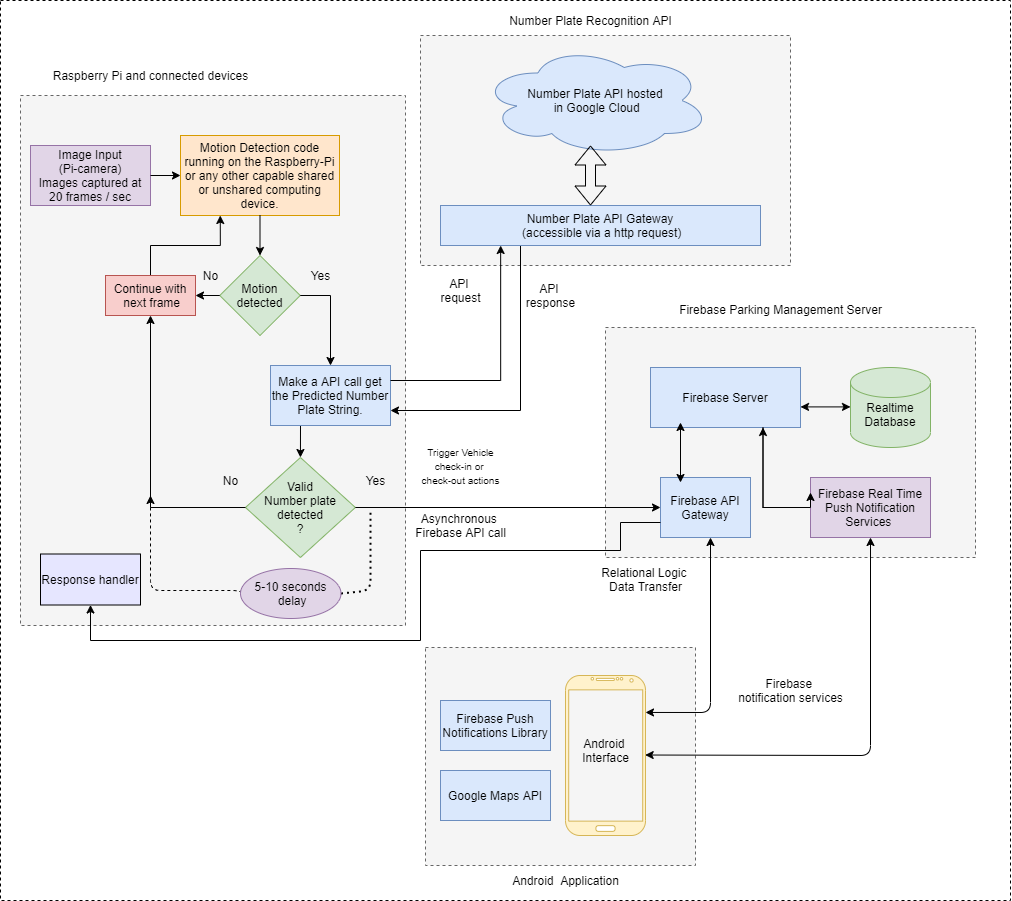
The system follows a microservices approach:
- Image Capture (Raspberry Pi + Camera): Detects motion, captures frames, and sends them to the LPR API.
- LPR Flask Microservice: Runs the full pipeline—detection, segmentation, recognition, and matching—exposed via REST endpoints.
- Firebase Backend: Stores users, parking slots, and event logs using cloud functions and NoSQL documents.
- Android Client: Provides user authentication, map-based parking browsing, slot booking, and history viewing.
LPR API Pipeline
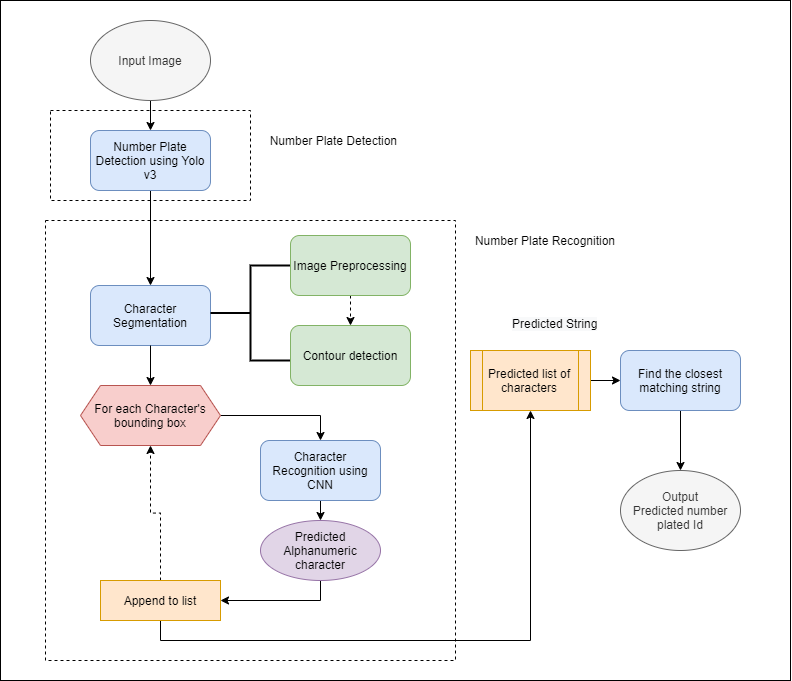
1. Plate Detection
- Trained YOLOv3 on ~1,800 images (1,600 train / 200 test).
- Achieved recall of 0.96 at 50% IoU and 0.87 at 75% IoU.
2. Character Segmentation
- Explored single-class YOLOv3 for characters.
- Implemented contour detection with pixel projections for robust segmentation.
3. Character Recognition
- CNN classifier over 35 merged classes (A–Z, 0–9 with ‘O/0’ combined).
- Trained on ~60,000 images, reaching 95.66% accuracy.
4. String Matching
- Applied Levenshtein distance to compare detected strings against registered plates, correcting minor errors.
5. Flask Integration
- Encapsulated all modules in
lpr.py. - Wrapped with
app.pyto expose HTTP endpoints and deployed on GCP.
Implementation Details
Project Structure:
1
2
3
4
5
6
7
8
9
lpr-flask-api/
├── app.py              # Starts the Flask server
├── lpr.py              # ML pipeline logic
├── request.py          # Sample client for testing
├── test_module.py      # Unit tests for core functions
├── registered_plates.json
├── images/             # Sample input images
├── requirements.txt    # Python dependencies
└── documentation/      # Diagrams and flowcharts
Prerequisites:
1
2
pip3 install tensorflow==1.14 opencv-python pillow
sudo apt-get install libsm6 libxrender1 libfontconfig1 libxext6
Ensure pretrained model weights are stored in a WEIGHTS/ directory at the root.
Running the Service:
- Start Flask:
1
2
export FLASK_APP=app.py
python3 -m flask run --host=0.0.0.0
- Test with a sample image:
1
python3 request.py
- Standalone LPR script:
1
python3 lpr.py --image path/to/your/image.jpg
Results & Evaluation
- Detection: 79/98 plates detected at 50% IoU (0.79 recall).
- Recognition: 93.67% accuracy over 4,000 test characters, loss = 0.058.
- End-to-End: 34/40 plates matched exactly (85% accuracy), ~4.8s per request.
Future Work
- Expand dataset for improved robustness.
- Experiment with ensemble models for edge cases.
- Build a real-time admin dashboard with analytics.
- Optimize concurrency for high-traffic scenarios.
Links